Global Trade Station
The Global Trade Station is where trainers buy and sell Pokémon and items among themselves. You list at a fixed price and walk away: whoever buys pays even while you are offline, and the money goes straight to your bank.
In Pocket World Online, quests, battles and rewards never pay money. You earn Pokémon Dollars (₽) only by selling: to merchants, at the Global Trade Station or in a trade with another player.
Where it is
Every Poke Mart has a Global Trade Station on its back wall, between the two windows.
Stand in front of it and click it (or press F) to open the window. It is the only way to
trade, and the window closes if you walk away.
New trainers wait a little: the Global Trade Station opens only once your account is 3 days old and you have played 10 hours on the character. A notice tells you how long is left.
The Global Trade Station window
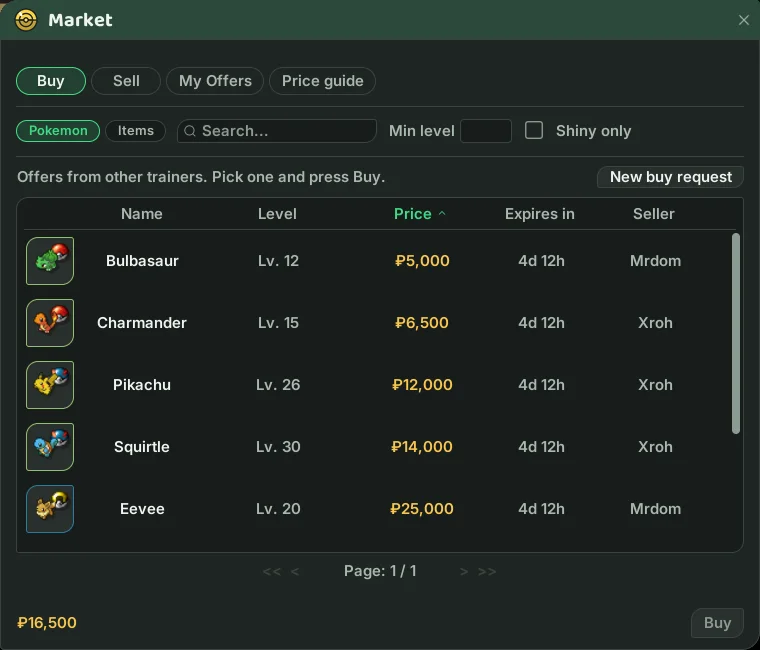
The window has four tabs. At the top, pick Pokémon or Items.
- Buy: offers from other trainers. Search by name, filter by Min level and Shiny only, and hover a row to see the item or Pokémon just as it looks in your bag.
- Sell: My items (what you can list) and Buy requests (trainers who want to buy).
- My Offers: your Active offers and the History of everything you bought and sold.
- Price guide: Most traded shows what sold most this week, its average price and how it moved since last week; Recent sales shows the latest sales of the last 30 days. Click Price to see the dearest or the cheapest, and search a name to see its median, lowest and highest price.
Sales between characters of the same account never count toward a public price.
Buying
- On the Buy tab, pick an offer and press Buy. From a stack of items you can take just part of it.
- The price comes out of your bank.
- The purchase goes to your Global Trade Station stash. On the My Offers tab, press Collect to receive it all.
A bought Pokémon goes to your Pokébar, or to a PC box if you already carry six. An item goes to your bag; if it does not fit, it waits in the stash. When you log in, the stash is collected by itself as far as your bag allows.
Selling
- On the Sell tab, under My items, pick the Pokémon or the item. The game shows last week's prices to help you.
- Type the price each, pick the duration and press List.
- The fee comes out of your bank at once, and the offer goes at the Global Trade Station.
When someone buys, the money goes to your bank, even while you are offline. A notice tells you what sold, for how much and how much you kept: right away, or the next time you log in.
To take an offer down, open My Offers, pick the offer and press Withdraw. What was on sale goes back to your Global Trade Station stash.
What cannot be listed:
- A Pokémon holding an item: take the item off first. The Global Trade Station sells only what the offer shows.
- A Pokémon out of its Poké Ball: recall it first (the game does it for you when you list).
- Bound items and Pokémon.
- Bags and other containers, tools with charges and timed accessories.
- A held item that was ever equipped on a Pokémon.
Only items in your bag and your Pokébar count; what you are wearing does not.
Buy requests
Can't find what you want? On the Buy tab, press New buy request:
- Pick the Pokémon (species, Min level and, if you like, Shiny only) or the item and the amount.
- Type the price and the duration and press Post request.
- You pay the total plus the fee now. The money is held until someone fills it.
Whoever has what you asked for opens Sell → Buy requests, picks your request and sells on the spot: they get the full price in their bank, and what you asked for goes to your Global Trade Station stash. If the request expires, all the money comes back, fee included; if you withdraw it, the fee is kept.
Anonymous offers
Tick Hide my name when you list or post a request, and others see Anonymous instead of your name. Only the name is hidden: a Pokémon's original trainer and nickname still show, as on any offer.
Fee, duration and limits
- Fee: 2% of the offer's total (at least ₽1), paid when you list. The Global Trade Station keeps it when the offer sells or when you withdraw it, and it comes back in full only if the offer expires unsold.
- Minimum: every offer must total at least ₽50.
- Duration: a sell offer lasts 1, 3 or 7 days; a buy request 1 or 3 days.
- How many offers: 1 open offer on a free account, 50 with VIP. Buy requests count toward the same limit. Buying has no limit.
- You cannot buy your own offer or fill your own request.
A bought Pokémon counts as traded
A Pokémon bought at the Global Trade Station counts as traded, so it qualifies for the trade evolutions (Kadabra, Machoke, Graveler, Haunter). An offer of yours that comes back unsold does not count.
Trading with players
To trade face to face:
- Right-click the other trainer and pick Trade (or right-click an item and pick Trade with ...). You have to be close, and nobody can be in a battle.
- The other trainer has 20 seconds to accept.
- Drag the item or Poké Ball you offer into your half of the window. To offer money, type the amount and press Offer: it comes out of your bank.
- Once both press Accept, the trade goes through and Trade completed. shows.
At least one item or Pokémon has to be on the table: money alone cannot close a trade.
- A traded Pokémon also counts as traded for the trade evolutions.
- Recall a Pokémon before trading it.
- If it is holding an item, the game warns you that the item goes along; offer again to confirm.
- You carry at most six Pokémon: any beyond that go to a PC box.
- New trainers (an account under 3 days old or under 10 hours of play) can receive in a trade, but cannot give items, Pokémon or money yet.
Selling to merchants
Marty, in every Poke Mart, opens his shop with a click. He sells the basics: Poké Ball, Great Ball, Ultra Ball, Potion, Revive and Full Heal. The rest comes from professions, quests and the Global Trade Station.
On the Sell tab, Marty buys anything you carry. Each item has its own price; what he looks for most is the materials wild Pokémon leave behind. An item with no value sells for ₽0, which is a way to get rid of it. Sell All sells the whole list at once. Pokémon cannot be sold to merchants, and bound items are worth nothing.
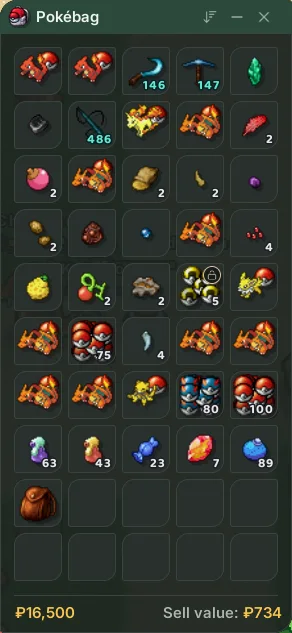
The bag's footer shows its Sell value: what a merchant would pay right now for everything in it. Bound items and items only players buy are not counted. If you are saving up for something at the Global Trade Station, hunt until that number covers the gap.