Events
A server event is a limited-time boost: while it runs, one of the game's rates is multiplied for every player. Events have no fixed day; the team schedules each one, and the event calendar shows what is planned.
The events
| Event | What it changes |
|---|---|
| Double EXP | The EXP for defeating wild Pokémon, for the trainer and for the Pokémon. |
| Shiny Hour | Shiny Pokémon show up more often. |
| Ditto Swarm | More wild Pokémon are secretly a disguised Ditto. |
| Fast Respawn | Wild Pokémon come back faster after being defeated. |
Every event comes with a multiplier (for example 2x), shown in the announcement, on the
calendar and on your trainer card. The multiplier can change from one event to the next.
Event calendar
Open the Events window with U or the calendar button in the menu.
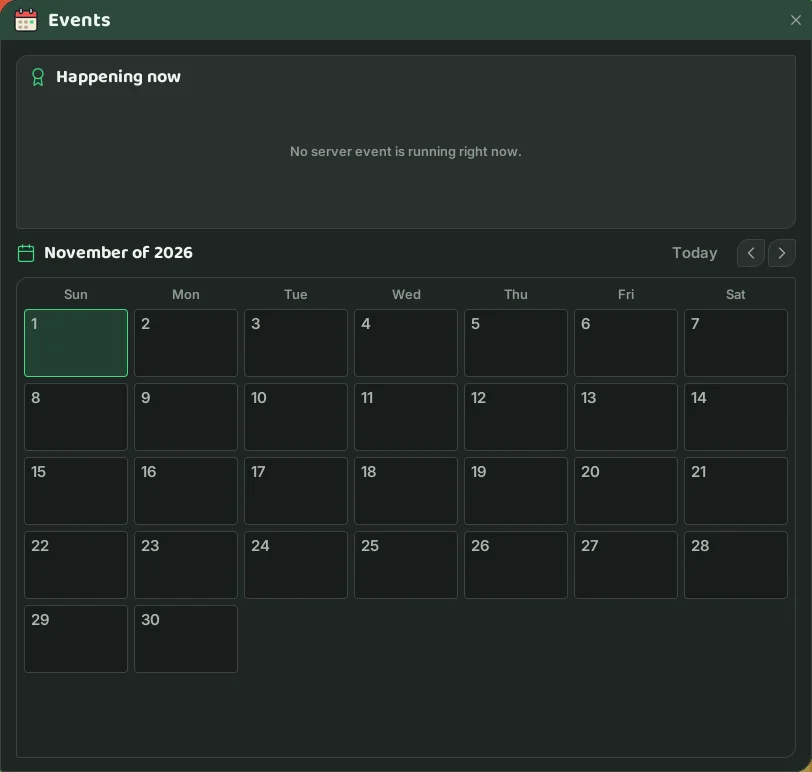
- Happening now, at the top, lists the running events with their multiplier and the time left. With none, the window says no server event is running right now.
- Below it is the month: every day with an event gets a chip, such as
2x Shiny Hour. Hover the day to see when it starts and ends. - The arrows show last month, this month and next month.
- Times are shown on your device's clock.
How you find out
- At the start: a message in the middle of the screen and in the Server Log tab, with a notification and a fanfare.
- Reminders: when 1 hour, 30 minutes, 10 minutes and 5 minutes are left.
- At the end: a message saying the event is over.
- When you log in: the Welcome back card lists the running and upcoming events.
- While it lasts: a chip with a countdown on your trainer card (the portrait next to the Pokébar).
Pokémon Center TV
The TV is not a server event, but it is where players show their own adventures live.
Watching
- Click the TV in any Pokémon Center.
- Pick a stream from the list (most watched first) and press Watch.
- You see exactly the streamer's screen and chat with them and the audience in the TV channel. Next stream and Previous stream switch channels; Exit takes you back to your own trainer.
Your trainer stays put in front of the TV: while watching you cannot walk, use items or fight. To watch, you cannot be mounted, in a battle or streaming yourself.
Going live
- Have a Camera in your bag. No shop sells the Camera: it comes from rewards and the Global Trade Station.
- Use the Camera, name your stream and press Go Live.
- Anyone at a Pokémon Center TV can watch. The stream ends when you press End Stream or log out.
Watching TV and going live can also come up as Route Challenges.