Game Controls
Pocket World Online uses a single control scheme. You don't have to choose between "classic" and "regular" controls like in other games: there is only one way to play, designed to feel natural from the very first click.
The golden rule
| Mouse action | What it does |
|---|---|
| Left click | The obvious action for that target (walk, use, open, talk, attack, fish) |
| Right click | The menu with that target's other options |
| Hover | Shows the item's information automatically |
Left click never opens a menu: it always does something directly. If you're not sure what to do with something, right-click it and look at the options.
To see an item's description, just hover over it: the information shows up on its own. A sign shows its text the same way.
Left click by target
| Target | Left click does |
|---|---|
| Ground / empty tile | Walks there |
| Usable item (ladder, lever, door) | Uses it |
| PC, TV, quest chest or profession workbench | Walks up to it and uses it |
| Container (bag, chest) | Opens it |
| Defeated Pokémon (body) | Loots straight into your bag (several bodies on one tile: all at once) |
| NPC | Talks |
| Wild Pokémon | Attacks: your active Pokémon starts the battle (you need a Pokémon out of its ball) |
| Your Pokémon | Mounts it, if it can carry you (Ride or Fly) |
| Small tree, breakable rock or dig spot | Your Pokémon uses Cut, Rock Smash or Dig |
| Water (with a rod worn) | Casts the rod |
| Item in your bag | Uses or equips it |
Right click (menu)
Right click opens that target's menu. Some of the options:
- Open (containers) and Harvest / Mine (with the right tool worn);
- Attack and Follow;
- on your Pokémon: Summary, Evolve and Remove held item;
- on another player: View Trainer, Trade, Challenge to Battle, Invite to Party, send a message and add to your VIP list;
- on yourself: Customise Character and Pokédex.
Some right clicks do something directly instead of opening the menu:
- On the ground, with a Pokémon out: your Pokémon walks there.
- On several bodies on one tile: loots them all at once.
- On your house door: opens the house window.
NPCs have no menu: left click (talk) is the only action.
Mouse shortcuts
| Shortcut | Does |
|---|---|
| Ctrl + click | Opens the item's menu, even with the left button (handy on laptops); on a container or body on the ground, opens it directly |
| Dragging a stack | Asks how many items to move |
| Shift + drag | Moves one item from the stack, without asking |
| Ctrl + drag | Moves the whole stack, without asking |
| Shift + click | With a PC box open, sends the whole stack from the bag to the box, or from the box to the bag |
Default keys
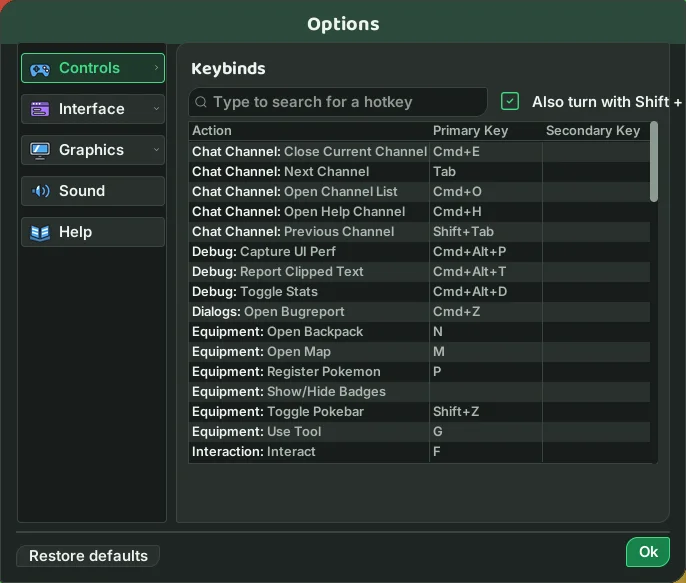
Every key can be changed. Press Esc to open the menu: each window has a button
there, and right-clicking the button shows or changes its shortcut. Letter keys
only work while the chat is closed: Enter opens the chat and, once you send, closes it again.
Walking and interacting
| Key | Does |
|---|---|
W A S D or arrow keys | Walk |
Ctrl + W A S D | Turn without walking (your Pokémon turns too) |
F | Interact with what is close: an NPC, PC, TV, chest, workbench, your own body next to you or a bush to Cut |
G | Use the equipped tool (rod, pickaxe, sickle) |
Esc | Stop all actions / open the menu |
Pokémon
| Key | Does |
|---|---|
Ctrl + 1 to 6 | Send out (or call back) the Pokémon in Pokébar slot 1 to 6 |
Tab / Shift + Tab | Attack the next / previous wild Pokémon, in Battle List order: whoever is attacking you first, then the nearest |
1 to 9 | Use your Pokémon's moves |
Space | Pokeview: see through your Pokémon's eyes and move it with the walk keys |
Shift + 1 to 8 | Use the ability in that position on the move bar (Surf, Cut, Fly...), from any living Pokémon in your Pokébar, no need to send it out |
P | Register a Pokémon in the Pokédex |
F1 to F12 | Shortcut bar |
Windows
| Key | Window | Key | Window |
|---|---|---|---|
N | Bag | L | Quest Log |
I | Inventory | T | Trainer Profile |
M | Map | R | Professions |
K | Move Bar | J | Trainer's Route |
Shift + K | Shortcut bar | U | Events |
Shift + Z | Pokébar | Y | Ranking |
B | Battle List | X | Pokemon Census |
V | Friends | H | Hunt Analyzer |
O | Options |
Screen and chat
| Key | Does |
|---|---|
Ctrl + = / Ctrl + - | Zoom the camera in / out |
Ctrl + N | Show or hide names and health bars |
Ctrl + Shift + F | Fullscreen |
Alt + → / Alt + ← | Next / previous chat channel |
Ctrl + L | Log out |
Touch screens work the same way: a tap is a left click, and a long press is a right
click. On a Mac, use Cmd wherever this page says Ctrl, and Option wherever it says Alt.