Houses
A house is a corner of the world that is yours alone: you decide who comes in and keep in it whatever you like. Everything happens at the door: right-click it to open the house window.
Where they are
For now the houses are in Viridian City: 18 cottages, Viridian Home 1 to Viridian Home 18. Each cottage's door leads inside the house. Hover a door to see the house's name, owner, size and price.
How to buy one
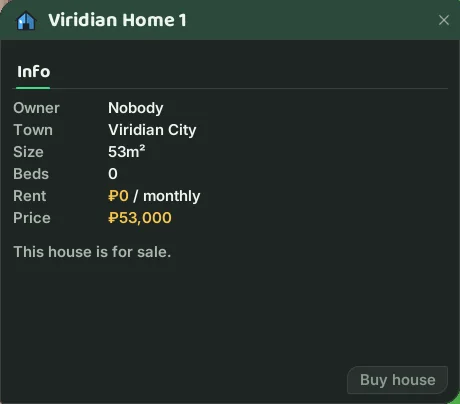
- Right-click the door of a house for sale (the window says This house is for sale.). Stay near the door while the window is open.
- The Info tab shows Owner, Town, Size, Rent and Price.
- Press Buy house and confirm the price. The house is yours at once.
The price is ₽1,000 per m². The Viridian houses are 53 or 54 m², so they cost around ₽53,000 to ₽54,000, taken from your bank. To buy one you need:
- an active VIP (without it the game says You need a premium account.);
- no other house: it is one house per character;
- the money in your bank.
If something is missing, the button is greyed out; hover it to see why.
Rent: houses currently charge no rent. The window shows No rent.
The owner's window
Someone who is not the owner sees only the Info tab. The owner gets three more tabs, each a list of names (one name per line; press Save):
- Guests: may enter the house.
- Subowners: may enter and edit the guest list.
- Door: only these players may open this door.
And four buttons at the bottom:
- Invite... adds a name to the guest list in one click.
- Uninvite... removes a name from the list, even while that player is offline.
- Kick... puts out someone who is inside the house right now.
- Sell... and Leave...: see below.
Who comes in and what to do inside
You, your subowners and your guests can come in. Anyone not on a list stays at the door.
Inside, keep and arrange your items on the floor: only you and the people on the house's lists can move them.
Selling or leaving
Selling the house to another player:
- Have the buyer stand next to you.
- Press Sell... and type their name.
- The normal trade window opens with the house in it. Agree on the price there: the buyer offers the money with Offer, as in any trade.
- Once both accept, the house passes to the buyer at the next server restart.
Leaving the house: press Leave... and confirm. There is no refund. Everything inside goes to your PC, and the house goes back on sale at the next server restart. You cannot leave a house that is in the middle of a sale.
If you go 30 days without logging in, you lose the house. Nothing is lost: everything inside goes to your PC.